I made my own AI chat application to adjust my resume for every new job I apply for.
If, like me, you have been applying for jobs, tailoring your resume multiple times to better fit the job description can get tiring. But aren’t we still unsure how effective it really is? I’m worried what questions the interviewer will ask about on my resume.
In today’s crazy competitive job market, making a resume that stands out is important. Tools like Ollama and Langchain offer nice useful AI models and tools that can not only be used to enhance your resume but also to prepare you for interviews.
Large Language Models (LLMs)
These are tools with which you may have interacted with through ChatGPT, Gemini, Claude or whatever. To use these to update a resume to get a better job we have to instruct, or prompt, them carefully. For me, it is best to make the prompt by role, task, input, and output method.
Define the role it is supposed to mimic, define its task in detail, tell what sort of inputs it should expect, and how it should give the results.
I’ve decided to take this a step further and develop my own application for my resumes.
Setup
For this application, I use the Llama3 model from Ollama with python and Langchain. Basically, this application will do these things:
- Read the job description provided
- Read your PDF resume
- Answer your questions based on your job description and resume
- Suggest modifications to your resume
- Do a mock interview
Instead of only working through the terminal, which I often do, I integrated streamlit into the AI Resume Chat application for an easier user interface.
Usage
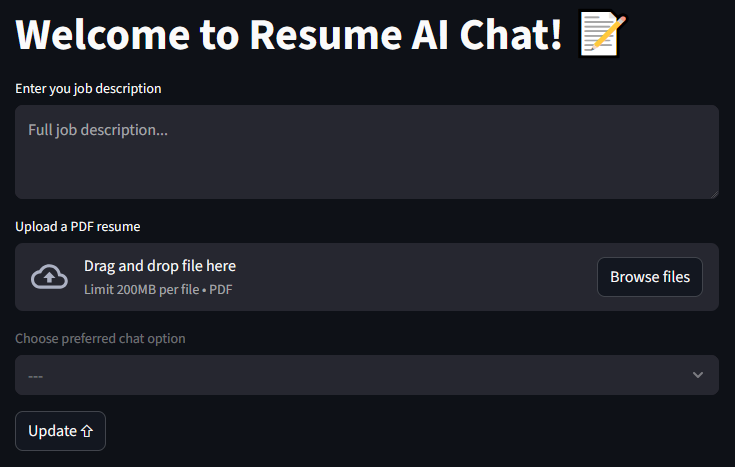
The first entry, the job description, will be a part of the system prompt itself. It is because all of the conversations will be dependent on it.
The second entry, a PDF resume, is the next part of the system prompt. RAG gets us the required snippets from the uploaded resume and, based on these, the application can extract relevant parts of the previous chat history which may be required. All of this is provided to the LLM which gives us its insights.
The third entry, a drop down, allows the selection of a chat option:
- Enhanced Resume
- Simulate Interview Both options have their own prompt, one to help enhance a resume and one to conduct an interview based on the job description and the provided resume.
After clicking the Update button the model is loaded with all of the necessary provided information. When the model is ready a new entry appears when the user can ask any questions like “How can I change my resume for this job description?”, “What is wrong with my resume?”, or “Hello! Let’s start the interview please.”
If you want to use it then please visit the GitHub repository and apply the directions in the README.md file. All of this assumes you have knowledge of using python.